
A quick text
Send items to a list you can edit. Successful, unambiguous typed additions can receive a 👍. Questions, warnings and errors keep a text reply when admitted.
 UrCartBuddy
Start free trial
Shared shopping, with messaging
Add items to UrCartBuddy from WhatsApp, in a one-to-one chat. Your household finds them with the rest of the shopping.
30 days free. No card required to start. Then £1.99/month if you choose to continue.
iPhone/iPad: open the web app in Safari, then Share → Add to Home Screen. Installation instructions. Computer: use any browser; optionally install from Chrome or Edge. The Android open beta is available on Google Play in the UK, US and all 27 EU countries.
Quick typed adds confirmed with 👍 don't use your WhatsApp reply allowance. When the reply allowance runs out, WhatsApp actions covered by that owner pause, including quick adds, until the first of the month (UK time).
Interpreting WhatsApp messages can use the separate AI allowance. Chat and Telegram don't use the WhatsApp reply allowance, but their AI features use the separate AI allowance. AI used on shared lists counts against the list owners' allowances. Full usage limits.
A connection code alone never links an account. UrCartBuddy uses a one-to-one chat, rather than joining your family group. It cannot read your other chats. UrCartBuddy is independent and is not endorsed by WhatsApp or Meta.
Household members who prefer WhatsApp or Telegram can help with the shopping without installing the UrCartBuddy app. Once they have joined your list, they can check what's needed. Members with edit access can also add or update items.
Each person joins through your invitation or connects their own account. Some steps open in a browser, such as confirming a WhatsApp number or reviewing a larger photo or recipe import. List permissions, the owner's active trial or plan and shared monthly allowances apply.
Send items to a list you can edit. Successful, unambiguous typed additions can receive a 👍. Questions, warnings and errors keep a text reply when admitted.
Photo and recipe imports of three or more items open a browser review before saving. Remove things you already have and choose your list. Ordinary Chat and voice actions can change items directly.
Add, find, move and update items across lists you can edit. An unnamed target uses your active or default list. Explore the AI features.
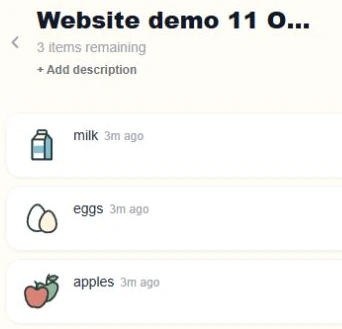
Once your number is connected, send shopping items to UrCartBuddy in a one-to-one WhatsApp chat, for a list you can edit. Here is a real demonstration on our own account, using a separate Website demo list.
“Add milk, eggs and apples to Website demo 11 October”
Name a list as shown, or omit its name to use your active or default list.
UrCartBuddy confirmed this addition with a 👍 reaction, rather than a text reply.
Successful, unambiguous typed adds can receive a thumbs-up. A quick typed add can instead receive a text reply if a reaction cannot be used.
Milk, eggs and apples are on Website demo 11 October in UrCartBuddy.
The approved recipe film follows a link from a one-to-one chat to ingredient review and a saved shopping list. Every screen is a genuine capture.
Household pricing and allowances · Recipe import guide · Use your list on your devices
0:00 Found a recipe you fancy? Skip copying out the ingredients.
0:05 Send the link to UrCartBuddy on WhatsApp.
0:09 It replies with the ingredients and a link to review them.
0:14 Open the link, remove anything you already have, and save them as a new shopping list.
0:23 Now your list in UrCartBuddy is ready to tick off at the shop.
0:29 Invite your family to the same list, so they can add what they need too.
0:34 Get started at UrCartBuddy dot com.
Upbeat instrumental music plays. A recipe is open in a browser. In a one-to-one WhatsApp chat, its link is sent to UrCartBuddy. The reply names ingredients and offers Review items. The review opens in the browser; an unneeded ingredient is removed and the remainder saved as a new list. The saved list is ticked and its invite controls are shown. The film ends with UrCartBuddy.com. Private link codes are masked.
Music: Funkorama by Kevin MacLeod, CC BY 4.0. Excerpt edited, level adjusted and faded.
No. Message UrCartBuddy in your own one-to-one chat. Your household shares the list in UrCartBuddy.
One subscription covers your household. Invite anyone to your lists — they add, tick and shop on your plan at no extra cost. They only need their own plan to create lists of their own. Owners and editors can change a list; viewers have read-only access. The list owner's trial or plan must be active for covered members to add, tick and shop. AI and reply allowances are shared across covered members.
An exhausted reply allowance pauses WhatsApp work, including quick typed adds. You can use Chat or Telegram subject to list access and the separate AI allowance. Monthly resets use UK time.
Yes, through your browser or a home-screen web app. There is no native iPhone app.
30 days free. No card required to start. Then £1.99/month if you choose to continue.
iPhone/iPad: open the web app in Safari, then Share → Add to Home Screen. Installation instructions. Computer: use any browser; optionally install from Chrome or Edge. The Android open beta is available on Google Play in the UK, US and all 27 EU countries.
